Statistics
Buka Logs → Statistics.
Kegunaan halaman ini
Aktivitas outbound teragregasi WhatsApp, WABA, Telegram, dan email — total, tingkat pengiriman dan kegagalan, tren harian, campuran channel, dan jenis pengiriman WhatsApp teratas.
Gunakan History atau log channel untuk pengiriman individual (penerima, pratinjau pesan, teks error). Statistics menampilkan total dan tren untuk jendela waktu yang Anda pilih.
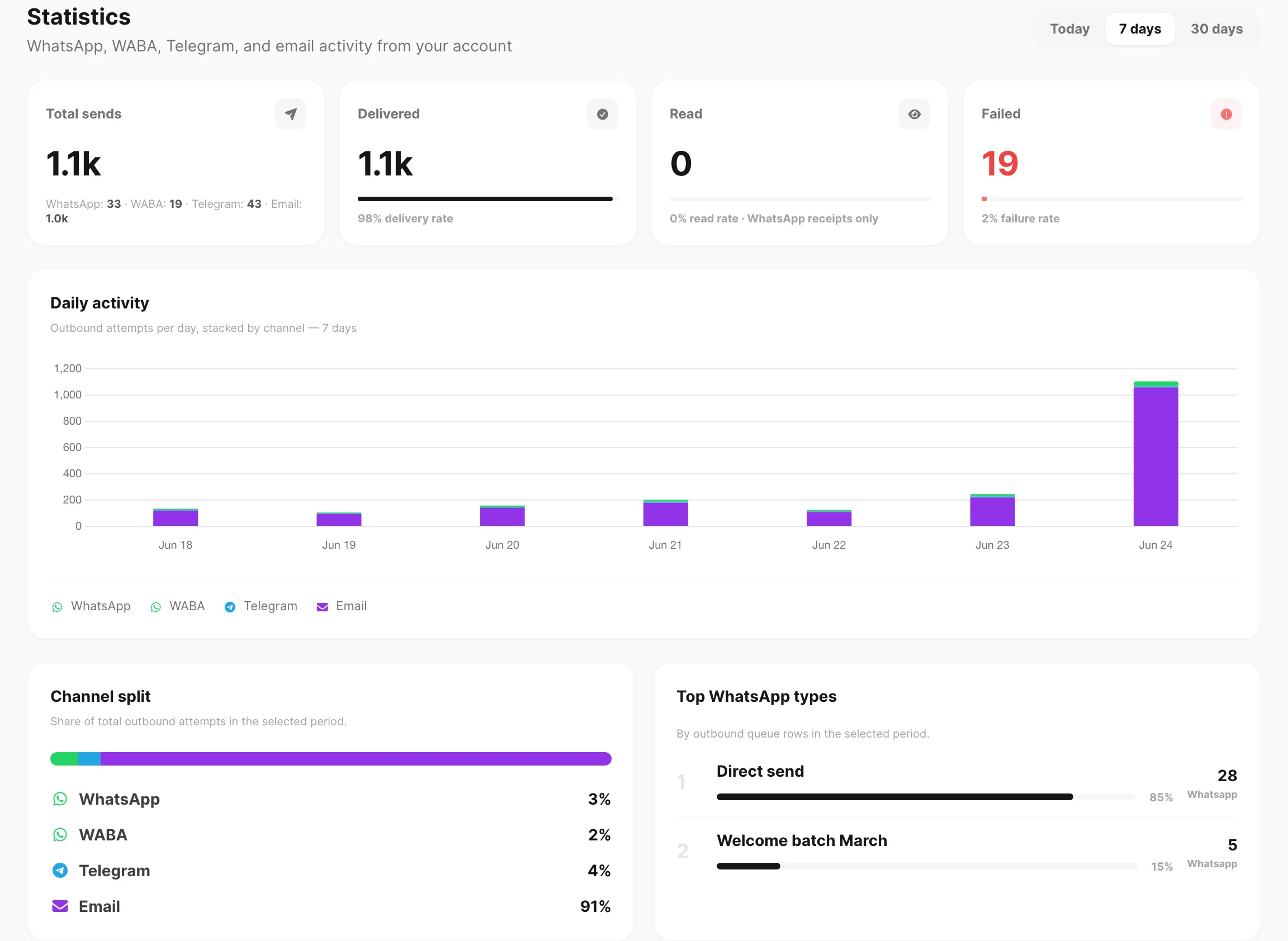
Contoh data ditampilkan.
| Kontrol header | Fungsi |
|---|---|
| Today | Dari tengah malam UTC hari ini hingga sekarang |
| 7 days | 7 hari terakhir bergulir |
| 30 days | 30 hari terakhir bergulir |
Setiap kartu dan grafik di halaman diperbarui saat Anda mengubah jendela.
Kartu KPI

Empat kartu di bagian atas:
| KPI | Arti |
|---|---|
| Total sends | Setiap upaya kirim dalam jendela — WhatsApp, WABA, Telegram, dan email digabung. Subtitle menampilkan jumlah tiap channel. |
| Delivered | Pengiriman tercatat sebagai sent, dengan bilah delivery rate |
| Read | Tanda baca WhatsApp jika tersedia (sering 0 jika tanda baca tidak dilacak) |
| Failed | Pengiriman dengan status failed atau partial, dengan bilah failure rate |
Total sends termasuk percobaan gagal. Volume tinggi dengan tingkat pengiriman rendah biasanya menunjuk ke koneksi device, kuota, atau masalah template — buka log channel terkait untuk error per baris.
Angka 1.1k atau lebih dipendekkan di kartu (misalnya 1.104 muncul sebagai 1.1k). Arahkan kursor ke batang grafik harian untuk jumlah persis.
Aktivitas harian
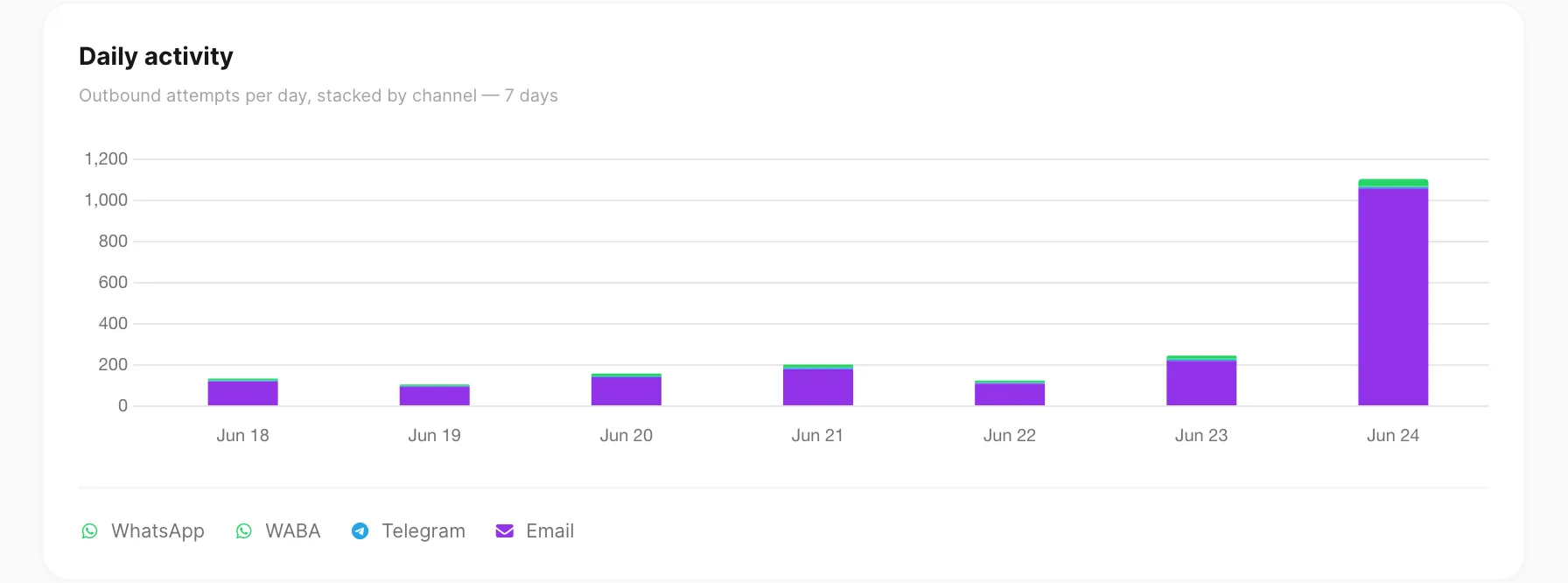
Batang bertumpuk menampilkan upaya kirim per hari UTC, dibagi per channel:
| Segmen | Channel |
|---|---|
| Hijau (ikon WhatsApp) | |
| Hijau gelap | WABA |
| Biru | Telegram |
| Indigo |
Arahkan kursor ke batang untuk melihat total hari dan jumlah per channel di tooltip.
Pada 30 days, grafik digulir horizontal dan menampilkan label tanggal berjarak. Halaman terbuka dengan scroll ke today (batang paling kanan).
Jika tidak ada aktivitas dalam jendela, grafik menampilkan No message activity in this period.
Channel split
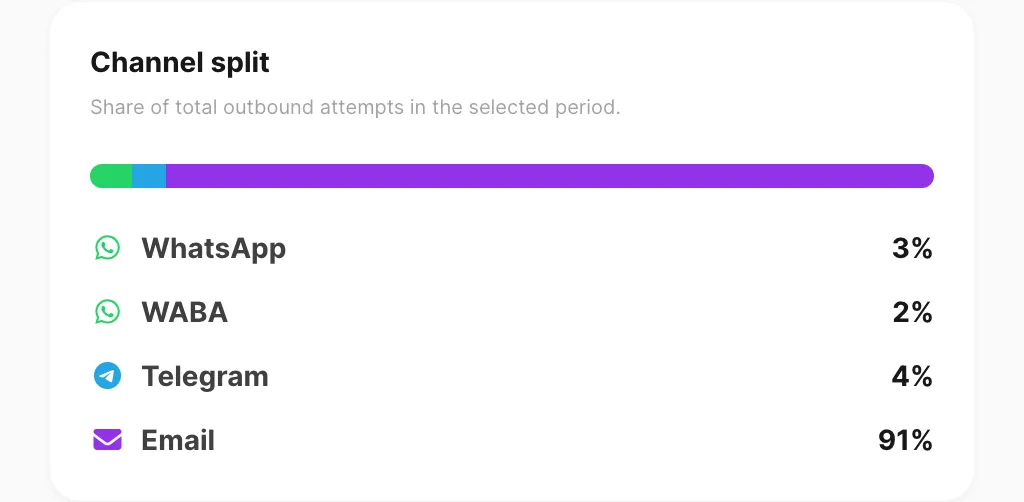
Bilah horizontal dan daftar menampilkan proporsi total sends setiap channel dalam jendela yang dipilih. Persentase berjumlah 100% jika keempat channel memiliki aktivitas.
Top WhatsApp types
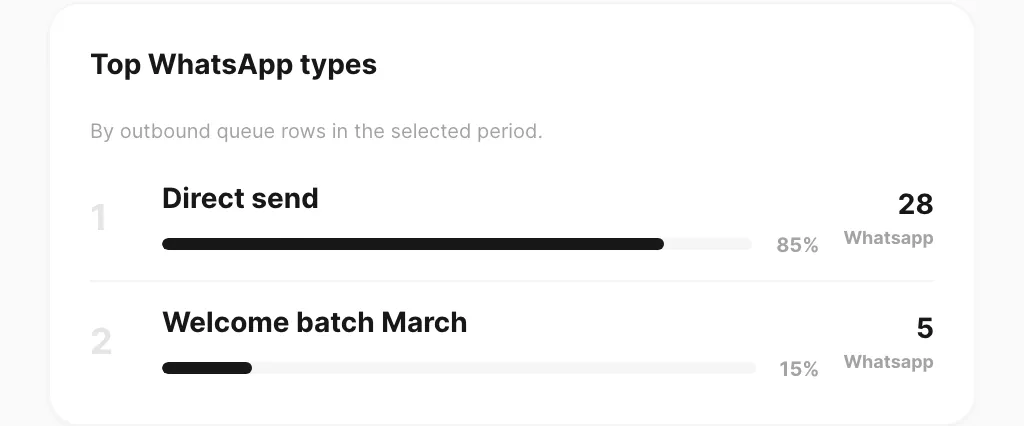
Daftar peringkat Direct send vs batch Campaign bernama dari baris outbound WhatsApp dalam periode, dengan proporsi volume WhatsApp dan total count.
Panel ini menghitung WhatsApp saja. Engagement email (buka, klik, bounce) ada di Channel → Email → Statistics, bukan di halaman ini.
Statistik per channel
Tata KPI yang sama untuk satu channel saja ada di:
| Halaman | Path sidebar |
|---|---|
| Statistik WhatsApp | Channel → WhatsApp → Statistics |
| Statistik WABA | Channel → WABA → Statistics |
| Statistik Telegram | Channel → Telegram → Statistics |
| Statistik Email | Channel → Email → Statistics |
Halaman tersebut menambahkan rincian by device (atau by number / by bot) dan grafik harian delivered-vs-failed untuk channel tersebut saja.
Beranda dashboard
Layar beranda Dashboard memakai jendela tetap 7-day dengan grafik harian serupa dan panel By channel. Buka Logs → Statistics jika Anda perlu Today atau 30 days, atau pembagian channel halaman penuh dan daftar top WhatsApp types. Lihat Tur dashboard.
Terkait
- Log pesan — History dan baris pengiriman per channel
- Inbox — pesan masuk WhatsApp, WABA & Telegram
- Baca statistik lintas channel — bandingkan jendela dan baca grafik harian
- Tur dashboard — KPI beranda dashboard (tampilan 7-day)
- Statistik WhatsApp — volume dan device khusus WhatsApp
- Statistik Email — buka, klik, dan deliverability