Afiliasi
Buka Billing → Affiliate.
Panduan ini untuk mitra afiliasi yang sudah disetujui. Untuk tur lengkap setiap layar, lihat Referensi program afiliasi.
Bagikan tautan referral Anda
Tujuan: Berikan URL pendaftaran kepada pelanggan baru agar Kirisan mengaitkan akun mereka dengan Anda.
Mulai saat: Billing → Affiliate menampilkan tautan referral Anda (Anda adalah afiliasi aktif).
- Buka Billing → Affiliate.
- Temukan kartu Referral link. Klik Copy (atau pilih dan salin URL sendiri).

- Anda seharusnya melihat toast Referral link copied saat menggunakan Copy.
- Kirim tautannya — misalnya
https://dash.kirisan.com/register?ref=YOURCODE— lewat email, chat, atau situs web Anda. - Minta orang tersebut mendaftar akun Kirisan baru melalui tautan itu. Akun yang sudah ada tidak bisa dikaitkan secara retroaktif.
Selesai saat: Mereka menyelesaikan pendaftaran dan muncul di Referred users di halaman afiliasi Anda (refresh jika perlu).
Ajukan penarikan komisi
Tujuan: Pindahkan saldo komisi yang tersedia ke rekening bank Anda.
Mulai saat: Available di Billing → Affiliate lebih dari nol dan akun Anda aktif (tanpa banner tidak aktif).
- Buka Billing → Affiliate dan gulir ke Request withdrawal.
- Masukkan Amount (IDR) — tidak lebih dari Available.
- Isi Bank name, Account number, dan Account holder persis seperti di rekening bank Anda.
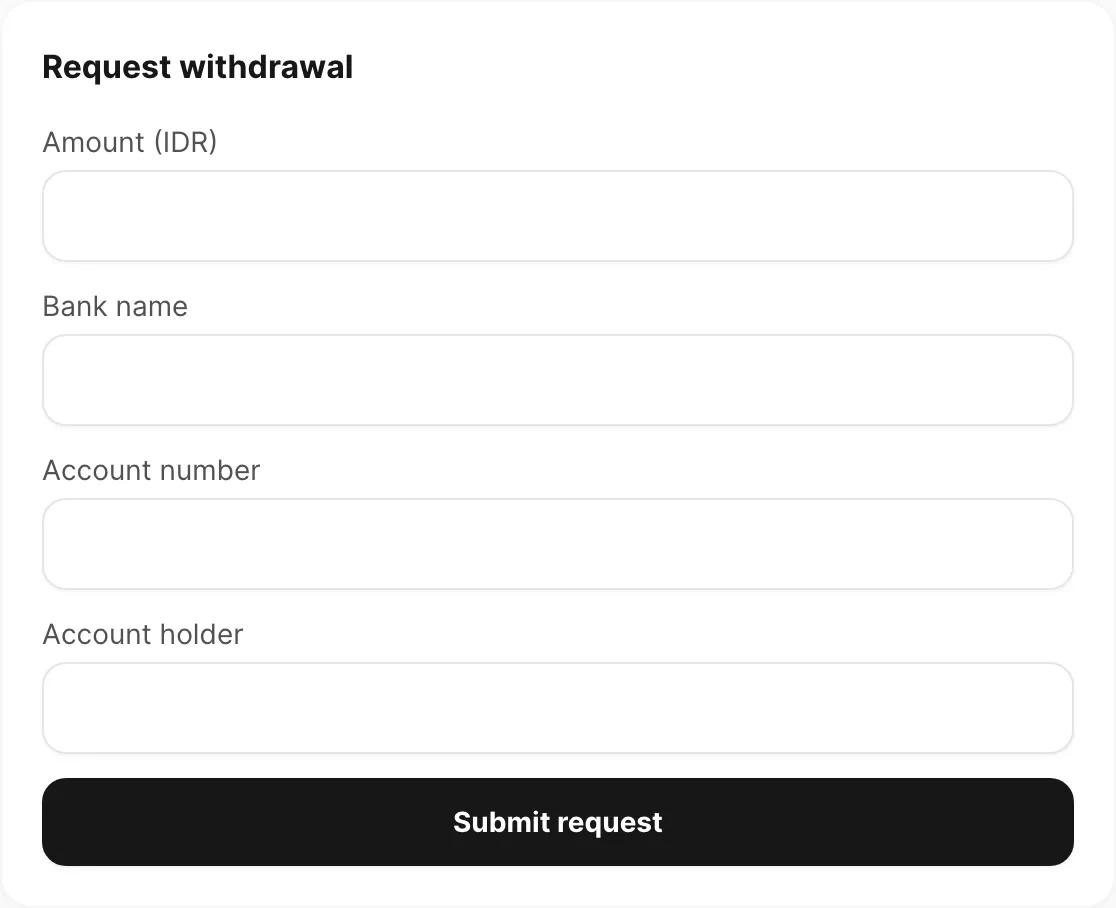
Klik Submit request.
- Anda seharusnya melihat toast sukses dan baris baru di Withdrawal history dengan status pending.
- Pending payout bertambah dan Available berkurang sebesar jumlah yang diminta.
Selesai saat: Permintaan menampilkan pending di Withdrawal history dan saldo tersedia Anda terbarui.
Perbaiki masalah umum
Gejala: Halaman menampilkan “Not an affiliate”.
Akses afiliasi ditetapkan oleh Kirisan. Hubungi dukungan jika Anda sudah disetujui tetapi halaman tidak ada atau menampilkan pesan ini.
Gejala: Banner kuning — “Your affiliate account is inactive”.
Anda masih bisa melihat statistik dan riwayat, tetapi Submit request dinonaktifkan. Hubungi dukungan untuk mengaktifkan kembali.
Gejala: Pengguna yang dirujuk tidak muncul di Referred users.
- Mereka harus membuka tautan referral lengkap Anda (
/register?ref=YOURCODE) setidaknya sekali — bukan hanya URL register biasa. Atribusi tetap berlaku hingga 90 hari setelah klik (cookie browser). - Hanya pendaftaran baru yang dikaitkan — akun yang sudah ada tidak bisa dikaitkan secara retroaktif.
- Refresh Billing → Affiliate setelah mereka menyelesaikan pendaftaran.
Gejala: Tidak ada komisi untuk pesanan pengguna yang dirujuk.
- Komisi dicatat setelah pesanan dibayar dan diverifikasi (status invoice success di Billing → Invoice).
- Beberapa jenis paket atau pesanan gratis mungkin tidak menghasilkan komisi — tarif ditetapkan per paket oleh Kirisan.
Gejala: Submit request gagal atau jumlah ditolak.
- Masukkan bilangan bulat positif yang tidak lebih besar dari Available.
- Periksa apakah penarikan pending lain sudah menggunakan saldo tersebut.
Terkait
- Referensi program afiliasi — penjelasan setiap kolom, kartu, dan tabel
- Tagihan & pembayaran — buat pesanan dan bayar invoice
- Referensi invoice — konfirmasi pembayaran sebelum mengharapkan komisi