Program affiliate
Buka Billing → Affiliate.
Untuk apa halaman ini
Halaman Affiliate program untuk partner Kirisan yang merujuk pelanggan baru. Salin tautan pendaftaran pribadi, lihat siapa yang mendaftar melalui tautan itu, tinjau komisi dari pesanan berbayar mereka, dan ajukan penarikan bank ketika saldo tersedia.
Akses affiliate diaktifkan oleh Kirisan hanya untuk partner yang disetujui. Jika Anda tidak melihat halaman ini atau melihat Not an affiliate, hubungi support.
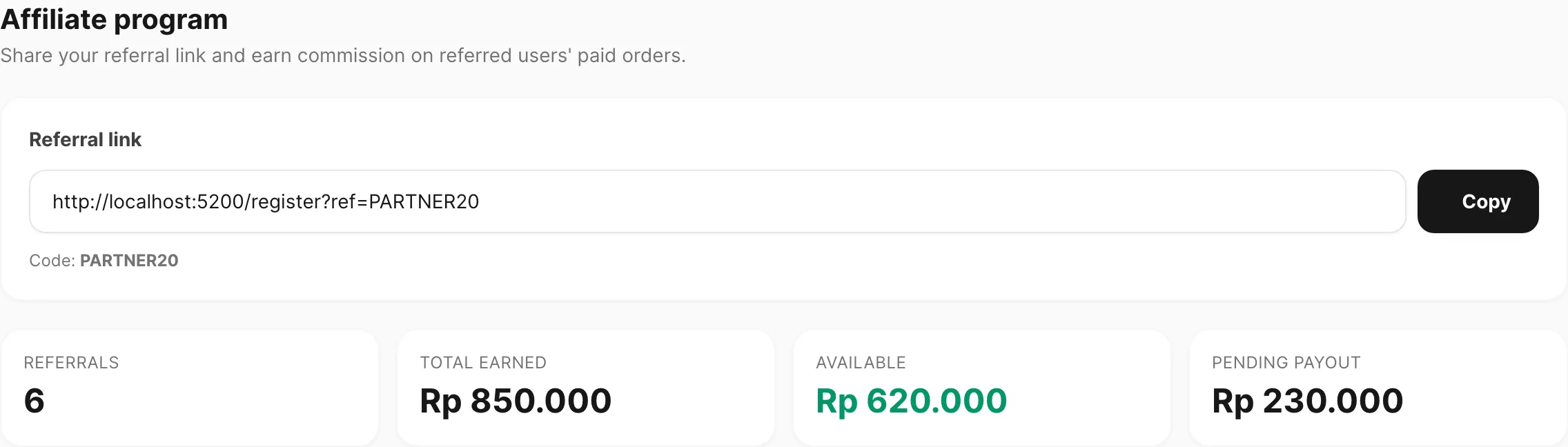
Contoh data ditampilkan.
| Area halaman | Fungsi |
|---|---|
| Referral link | URL pendaftaran dengan kode Anda — bagikan agar pengguna baru mendaftar dengan atribusi Anda |
| Kartu ringkasan | Referrals, Total earned, saldo Available, dan Pending payout |
| Referred users | Akun yang mendaftar melalui tautan Anda |
| Request withdrawal | Ajukan payout bank dari saldo tersedia |
| Withdrawal history | Permintaan payout sebelumnya dan statusnya |
| Commission history | Setiap baris komisi dari pembayaran terverifikasi pengguna yang dirujuk |
Tautan referral
Tautan Anda mengarahkan orang ke pendaftaran Kirisan dengan kode Anda terlampir (misalnya …/register?ref=PARTNER20).
| Kontrol | Fungsi |
|---|---|
| Field tautan | URL read-only — pilih dan salin, atau gunakan Copy |
| Code | Kode singkat ditampilkan di bawah tautan untuk referensi |
Pengguna baru yang menyelesaikan pendaftaran melalui tautan ini dihitung sebagai referral Anda. Jika mereka membuka tautan tetapi mendaftar nanti, atribusi tetap berlaku hingga 90 hari (cookie di browser mereka). Mereka memakai dashboard seperti biasa — tidak ada layar “referred user” terpisah untuk mereka.

Contoh data ditampilkan.
Kartu ringkasan
Empat kartu di bagian atas mencerminkan akun affiliate Anda:
| Kartu | Arti |
|---|---|
| Referrals | Berapa banyak pengguna mendaftar dengan kode Anda |
| Total earned | Semua komisi yang dikreditkan ke akun Anda |
| Available | Saldo yang dapat Anda tarik (earned dikurangi withdrawal pending atau sudah dibayar) |
| Pending payout | Jumlah permintaan penarikan yang masih diproses |
Jika akun Anda inactive, banner muncul di bagian atas dan Submit request tetap nonaktif sampai Kirisan mengaktifkan kembali.
Referred users
Tabel Referred users mencantumkan semua orang yang diatribusikan ke kode Anda.
| Kolom | Arti |
|---|---|
| Signed up | Kapan akun dibuat |
| User | Username di Kirisan |
| Email pendaftaran |
Gunakan paginasi di bawah jika daftar panjang.
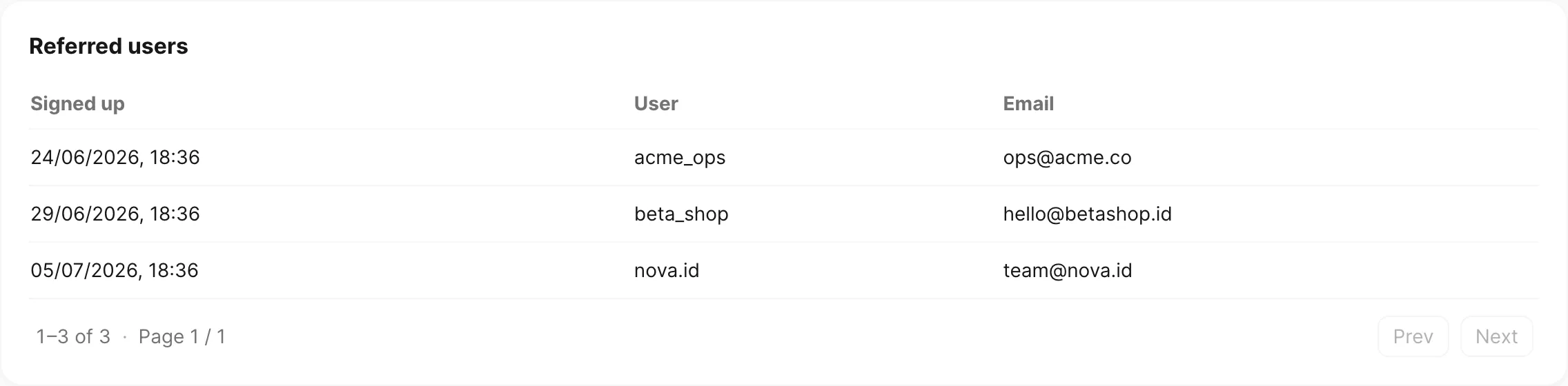
Contoh data ditampilkan.
Komisi
Commission history menampilkan setiap kredit setelah pesanan pengguna yang dirujuk dibayar dan diverifikasi.
| Kolom | Arti |
|---|---|
| Date | Kapan komisi dicatat |
| Order | ID pesanan Kirisan |
| Channel | Channel produk (WhatsApp, WABA, email, Telegram, storage) |
| Plan | Kode plan pada baris pesanan itu |
| Amount | Komisi dalam IDR untuk baris tersebut |
Tarif komisi
Anda mendapat jumlah tetap dalam IDR untuk setiap baris plan yang dibayar — bukan persentase dari harga pesanan. Tarif yang sama berlaku untuk WhatsApp, WABA, email, dan Telegram jika tier plan cocok.
| Plan | Komisi (IDR) |
|---|---|
| Lite | Rp 0 |
| Regular | Rp 10.000 |
| Regular Pro | Rp 15.000 |
| Super | Rp 25.000 |
| Advanced | Rp 40.000 |
| Master | Rp 50.000 |
| Ultra | Rp 50.000 |
Anda mendapat komisi dari pesanan berbayar berulang pengguna yang dirujuk — setiap order paket device (termasuk perpanjangan) mendapat komisi lagi. Komisi tidak kedaluwarsa. Diskon kupon di checkout mereka tidak mengurangi komisi Anda.
Komisi muncul setelah pembayaran diverifikasi, sama seperti invoice berpindah ke success di Billing → Invoice.
Penarikan
Ketika saldo Available minimal Rp 50.000 dan akun Anda aktif, gunakan Request withdrawal.
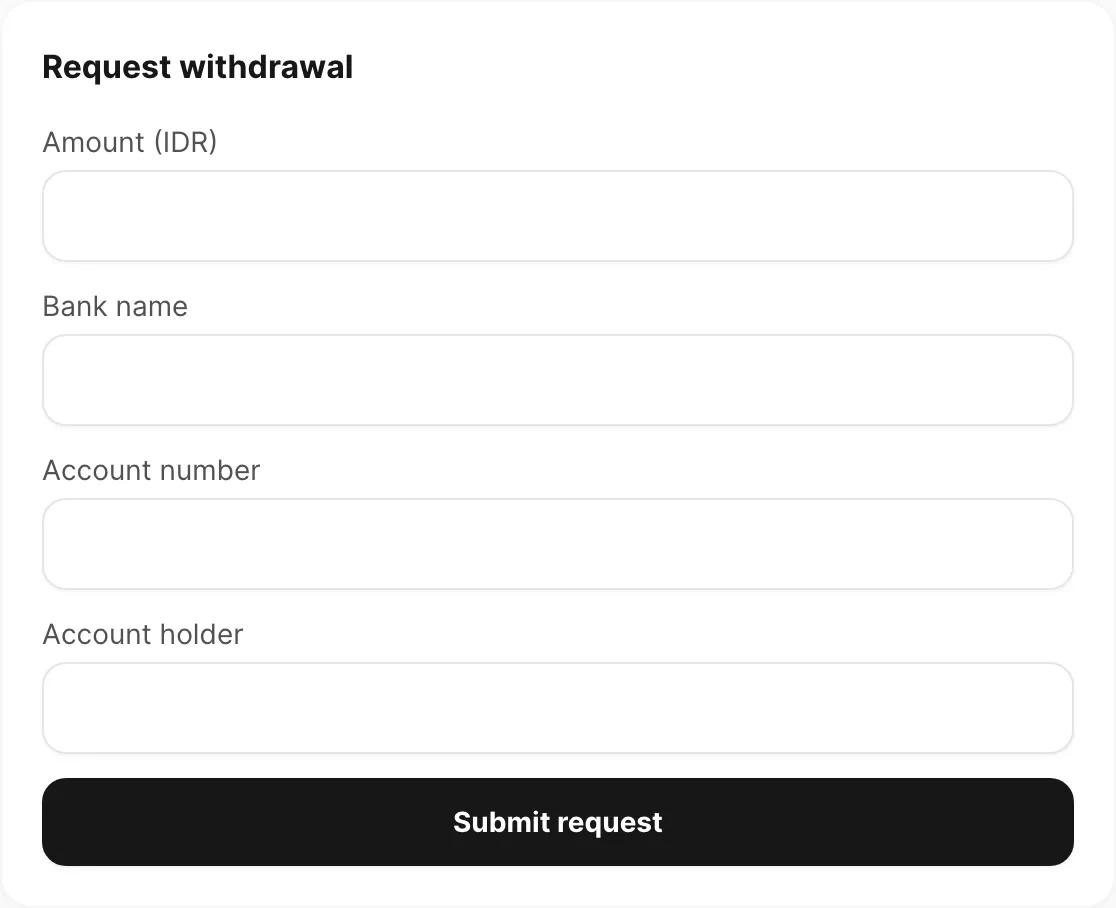
Contoh data ditampilkan.
| Field | Yang dimasukkan |
|---|---|
| Amount (IDR) | Jumlah rupiah bulat — minimal Rp 50.000, dan tidak boleh melebihi saldo tersedia |
| Bank name | Bank Anda (misalnya BCA, Mandiri) |
| Account number | Nomor rekening tujuan |
| Account holder | Nama pada rekening bank |
Klik Submit request. Kirisan meninjau permintaan; status muncul di Withdrawal history:
| Status | Arti |
|---|---|
| pending | Diajukan — menunggu Kirisan memproses |
| paid | Ditransfer ke bank Anda |
| rejected | Tidak dibayar — hubungi support jika perlu detail |
Withdrawal pending mengurangi saldo Available sampai dibayar atau ditolak. Komisi sendiri tidak kedaluwarsa — saldo tetap sampai Anda tarik. Anda terus mendapat komisi di setiap paket device berbayar dari pengguna yang dirujuk (termasuk perpanjangan).
Terkait
- Place an order — apa yang dibeli pengguna dirujuk setelah mendaftar
- Invoices — status pembayaran pesanan
- Share your referral link — langkah demi langkah untuk partner
- Apply a coupon on checkout — diskon untuk pengguna dirujuk (terpisah dari komisi Anda)