Grup WhatsApp
Buka Contact → WA Groups.
Fungsi halaman ini
WhatsApp Groups mencantumkan grup obrolan yang telah diikuti device WhatsApp terhubung Anda — bukan Contact → Groups, yang merupakan daftar kontak dashboard.
Gunakan halaman ini untuk menemukan nama grup dan JID (ID grup WhatsApp), lalu kirim ke obrolan tersebut dari Send → Send dengan target WA Group.
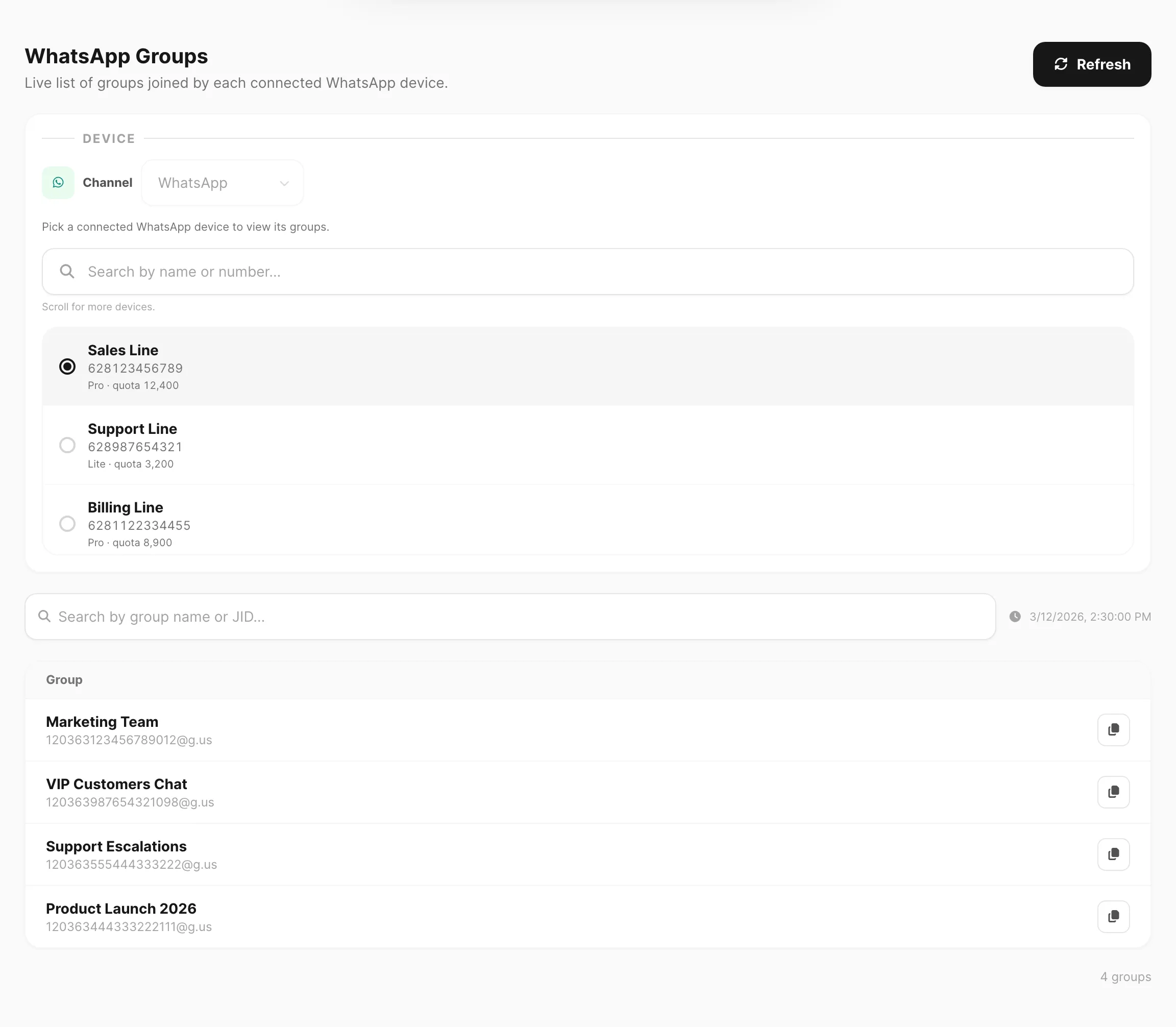
Data sampel ditampilkan.
Sebelum memulai
- Tambahkan token API akun Fonnte di Channel → WhatsApp → Token.
- Hubungkan setidaknya satu device WhatsApp di Channel → WhatsApp → Devices.
- Device harus terhubung dan menjadi anggota grup WhatsApp yang ingin Anda lihat.
Tata letak halaman
| Kontrol / kolom | Fungsi |
|---|---|
| Refresh | Minta WhatsApp untuk daftar grup terbaru untuk device terpilih, lalu muat ulang tabel. |
| Account | Ditampilkan jika Anda memiliki lebih dari satu token Fonnte — pilih device akun mana yang akan dijelajahi. |
| Device | Ditampilkan jika akun memiliki lebih dari satu device — pilih jalur WhatsApp yang grupnya Anda inginkan. |
| Search by group name or JID… | Memfilter daftar yang dimuat di halaman ini (client-side). |
| Last synced | Stempel waktu muatan berhasil terakhir untuk device saat ini. |
| Group | Nama tampilan dan JID (misalnya 120363…@g.us). |
| Copy JID | Menyalin JID grup ke clipboard untuk digunakan di Send atau integrasi. |
Jika Anda hanya memiliki satu akun dan satu device, pemilih disembunyikan dan ringkasan device singkat ditampilkan sebagai gantinya.
Muat dan segarkan grup
Pada kunjungan pertama, Kirisan memuat grup untuk device terpilih secara otomatis:
- Membaca daftar cache dari Fonnte.
- Jika belum ada yang di-cache, menjalankan fetch dari WhatsApp, lalu memuat daftar.
Klik Refresh saat Anda memerlukan daftar terkini — misalnya setelah device bergabung ke grup baru. Refresh selalu mengambil dari WhatsApp terlebih dahulu, lalu memuat ulang tabel.
Kirim ke grup WhatsApp
- Salin JID grup dari halaman ini (Copy JID).
- Buka Send → Send.
- Aktifkan WhatsApp only (WA Group memerlukan WhatsApp sebagai satu-satunya channel).
- Di langkah 3 (Target), pilih WA Group dan pilih grup (atau tempel/gunakan JID tergantung UI Send).
- Susun pesan Anda dan kirim atau simpan sebagai kampanye.
Lihat Send messages — target WA Group.
| Contact → Groups | Contact → WA Groups (halaman ini) | |
|---|---|---|
| Apa itu | Segmen kontak dashboard | Grup obrolan WhatsApp nyata |
| Digunakan untuk | Mengirim pesan ke kontak direktori | Mengirim pesan ke grup obrolan WhatsApp |
| Target pengiriman | Group | WA Group |
| Channel | Channel yang diaktifkan mana pun | WhatsApp only |
Tips
- Jika daftar kosong, pastikan device terhubung dan telah bergabung ke grup di WhatsApp, lalu klik Refresh.
- Nama grup berasal dari WhatsApp — diperbarui saat seseorang mengubah subjek grup.
- JID adalah pengenal stabil; salin JID saat menghubungkan otomasi atau Send API.
Terkait
- Groups — segmen kontak dashboard (berbeda dari WA Groups)
- All Contacts — penerima individual
- Send messages — target WA Group
- WhatsApp Token — token akun Fonnte
- WhatsApp Devices — hubungkan jalur