Plan dan kuota
Buka Billing → Order untuk membeli plan, atau periksa kredit di baris device atau domain di Channel.
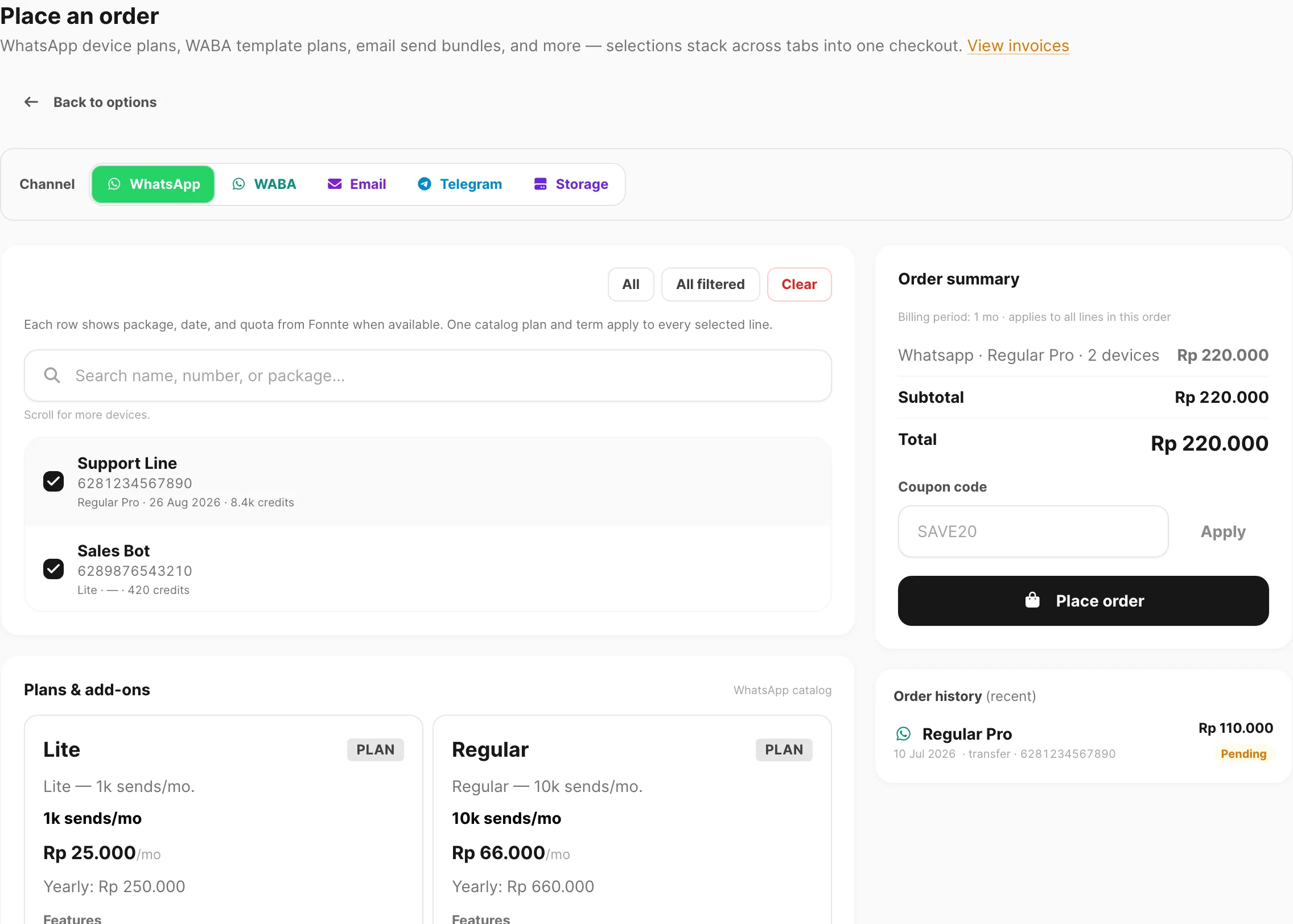
Data sampel ditampilkan.
Untuk apa halaman ini
Produk pesan Kirisan — WABA, Telegram, dan domain Email — berbagi model kuota yang sama. Setiap device, bot, atau domain punya credits (kuota send), plan (free atau berbayar), dan tanggal expiry. Halaman ini menjelaskan bagaimana nilai tersebut berubah saat Anda membuat target, place order, memperpanjang, ganti plan, atau kehabisan waktu.
Storage dan WhatsApp (Fonnte) memakai aturan berbeda — lihat Storage di Place an order dan WhatsApp devices.
Free tier (setiap device atau domain baru)
Ketika Anda menambahkan nomor WABA, bot Telegram, atau domain email, target dimulai pada free plan:
| Item | Nilai |
|---|---|
| Credits | 1.000 send |
| Validity | 30 days sejak pembuatan (atau sejak refill free terakhir) |
| Plan badge | Free — hijau jika aktif, merah jika parked |
Free tier menerapkan branding Kirisan pada pesan keluar di channel yang mendukung.
Satu slot free aktif per channel
Hanya satu nomor WABA free, satu bot Telegram free, dan satu domain email free yang dapat mengirim sekaligus:
| Badge | Arti |
|---|---|
| Green Free | Slot free aktif — target ini dapat mengirim |
| Red Free | Parked — pada free tier tetapi tidak bisa mengirim sampai Anda mengaktifkannya |
- Device atau domain pertama yang Anda tambahkan di channel menjadi slot free aktif otomatis.
- Ganti slot dengan Use as active free device (atau Use as active free domain) pada baris parked — paling banyak sekali setiap 7 days.
- Upgrade ke paid plan di Billing → Order menghapus target itu dari slot free otomatis.
Plan berbayar
Beli plan di Billing → Order untuk WABA, Telegram, atau Email. Tier katalog (Lite, Regular, Master, dan lainnya) menetapkan kuota send bulanan dan harga — lihat tabel plan di Place an order.
Setelah pembayaran diverifikasi:
| Field | Yang Anda dapat |
|---|---|
| Plan | Tier yang Anda beli |
| Credits | Kuota plan untuk periode billing (pesanan tahunan memberikan 12× kuota bulanan per unit tahun) |
| Expires | Akhir term berbayar — 30 days per unit bulanan, 365 days per unit tahunan (dikalikan panjang Billing period saat Anda memesan 3 bulan, 6 bulan, dll.) |
Setiap send keluar berhasil pada target itu memakai 1 credit, kecuali plan unlimited (Master / Ultra di channel yang didukung).
Periksa Credits dan Expires di tabel device atau domain, atau klik badge Plan untuk popup ringkasan.
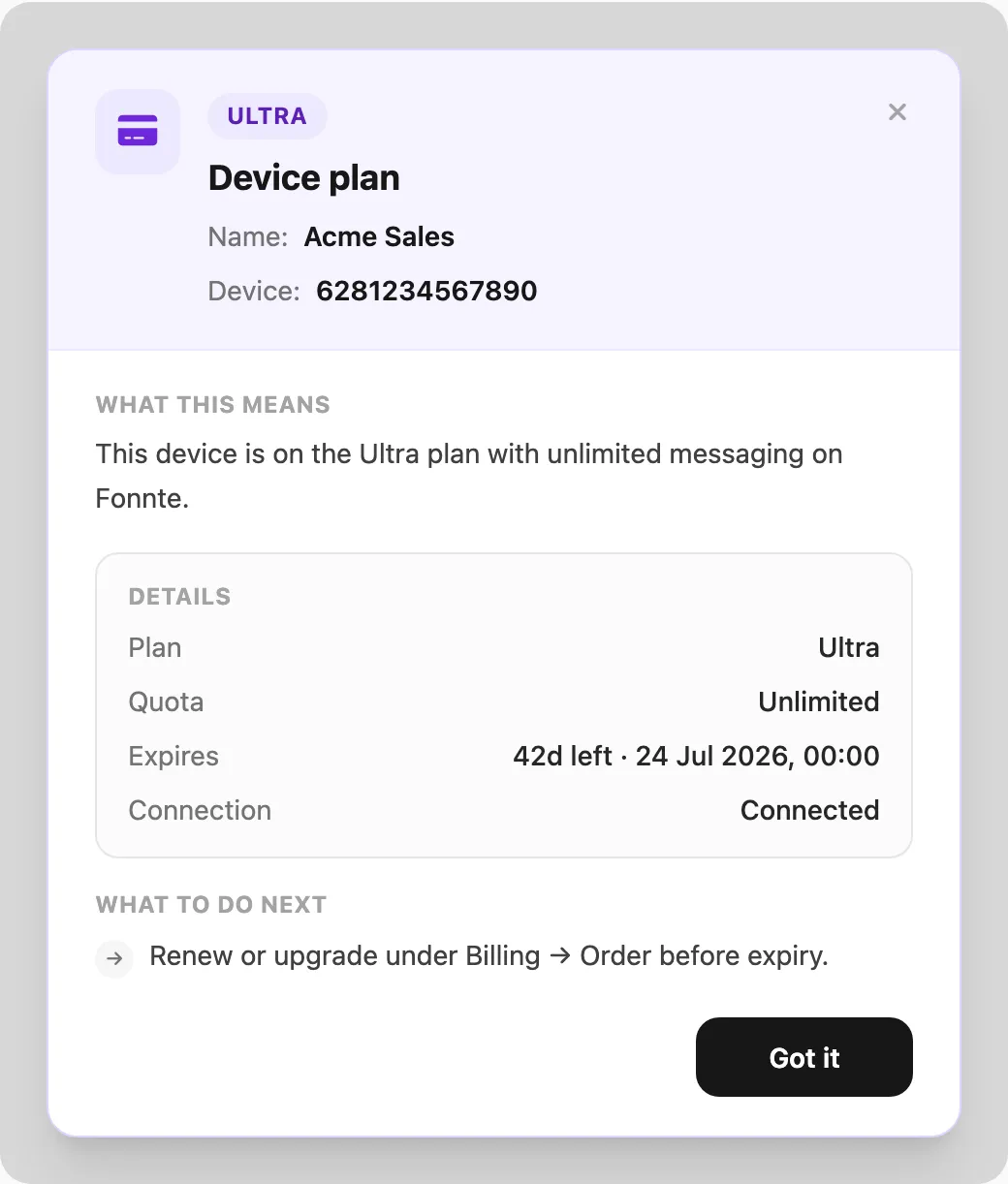
Data sampel ditampilkan (popup plan device WhatsApp; WABA, Telegram, dan Email memakai pola yang sama).
Perpanjang plan yang sama (akumulasi)
Selama plan berbayar yang sama masih aktif (belum kedaluwarsa), membeli plan itu lagi menambah ke saldo yang sudah ada:
| Perpanjangan (plan sama, masih aktif) | |
|---|---|
| Credits | Ditambahkan ke saldo saat ini |
| Expiry | Diperpanjang dari tanggal expiry saat ini — tidak direset ke hari ini |
Contoh: Regular dengan 3.000 credits tersisa dan 10 hari tersisa → Anda pesan Regular 1 bulan → credits menjadi 3.000 + 10.000 dan expiry maju 30 hari dari expiry lama.
Checkout dan pratinjau invoice menampilkan Currently expires … → expected active until … untuk kasus ini.
Ganti plan di tengah langganan
Membeli plan berbeda saat plan berbayar masih aktif mengakhiri langganan saat ini segera:
| Ganti plan (tier berbeda, masih aktif) | |
|---|---|
| Credits | Diganti dengan kuota penuh plan baru — sisa credits tidak dibawa |
| Expiry | Direset dari hari ini untuk periode billing baru |
Contoh: Lite dengan 800 credits dan 20 hari tersisa → Anda pesan Regular → Anda menerima kuota penuh Regular dan term 30 hari baru mulai hari ini. Saldo Lite dan hari tersisa dibuang.
Tidak ada refund sebagian untuk credits atau waktu tidak terpakai saat ganti tier.
Setelah plan kedaluwarsa
Plan berbayar kedaluwarsa
Ketika term berbayar berakhir:
- Target kembali ke free plan dengan 1.000 credits dan jendela 30-day baru.
- Jika Anda tidak punya target free aktif lain di channel itu, target ini menjadi active free slot.
- Jika target free lain sudah aktif, target ini tetap parked ( Free merah) sampai Anda ganti slot.
Free plan kedaluwarsa (slot aktif saja)
Ketika jendela 30 hari target free aktif berakhir dan credits habis, Kirisan mengisi ulang ke 1.000 credits dan memulai periode 30-day lagi otomatis.
Target free parked tidak diisi ulang sampai Anda jadikan slot aktif.
Pesanan → pembayaran → plan diterapkan
Alur end-to-end:
- Billing → Order — pilih channel, target, plan, dan periode billing → Place order (kupon opsional). Kupon channel memakai Redeem a coupon / Checkout with coupon.
- Pembayaran — jika Total di atas Rp 0, buka Billing → Checkout dan bayar via transfer bank (jumlah tepat termasuk kode unik). Pesanan kupon dengan sisa bayar harus dibayar dalam 15 menit. Jika kupon membuat Total = Rp 0, Kirisan melewati checkout dan menyetujui segera.
- Verifikasi — Kirisan menandai invoice success (manual untuk transfer; instan untuk pesanan kupon gratis; deposit mungkin langsung untuk beberapa pesanan email).
- Fulfillment — credits, plan, dan expiry diperbarui pada setiap target dalam pesanan.
Lacak status di Billing → Invoice. Unduh PDF dari Billing → Receipts setelah pembayaran (atau langsung untuk pesanan kupon gratis).
Retensi data
Kirisan menghapus baris pesan secara otomatis setelah jendela tetap berdasarkan paket akun. Lampiran tersimpan tetap ada kecuali Anda menghapusnya (atau memakai Files → Bersihkan orphan).
| Paket akun | Inbox / pesan masuk | Log audit kirim | Lampiran inbound tersimpan |
|---|---|---|---|
| Free (tidak ada paket messaging/email berbayar aktif) | 7 hari | 7 hari | Permanen (kuota berlaku) |
| Berbayar (paket WhatsApp, WABA, Telegram, atau email non-Free) | 30 hari | 30 hari | Permanen (kuota berlaku) |
- Inbox mencakup Logs → Inbox (WhatsApp, WABA, Telegram) dan Email → Inbox.
- Saat baris inbox dihapus, file terkait tetap di storage tetapi kehilangan tautan inbox — bersihkan di Files.
- Add-on storage: jika tidak diperpanjang, file tidak dapat diakses selama 14 hari, lalu dihapus — lihat Files → Jika storage tidak diperpanjang.
Pengiriman diblokir?
| Pesan / status | Penyebab tipikal |
|---|---|
| Out of credits | Credits adalah 0 — perpanjang di Billing → Order atau tunggu refill free jika memenuhi syarat |
| Free tier inactive | Target red Free (parked) — aktifkan slot atau upgrade ke berbayar |
| Plan expired | Term berbayar berakhir — target mungkin pada free tier atau menunggu refill; periksa badge Plan |
| WABA Meta fees | Terpisah dari credits Kirisan — lihat WABA billing |
Terkait
- Place an order — beli atau perpanjang plan
- Checkout — bayar invoice pending
- Invoices — status pembayaran
- Files — retensi lampiran inbound
- WABA devices — nomor, slot free, dan badge plan
- Telegram devices — bot, slot free, dan badge plan
- Email domains — domain, slot free, dan badge plan
- Pay by bank transfer — tutorial checkout langkah demi langkah